An hour-by-hour board is a sheet at the line that splits the shift's target into hourly targets, records what each hour actually made, and asks why whenever an hour falls short. The team fills it in during the shift, not after it, so a problem shows up within the hour it happened instead of on tomorrow's report. It is also called a production tracking board or a production analysis board.
Hour target = shift target × (minutes worked in that hour ÷ minutes worked in the shift)
Why hourly, and not just end of shift
An end-of-shift total tells you that you missed by 58 units. It doesn't tell you when you
missed, and by the next morning nobody remembers. The Lean Day Toolkit poster puts it this
way: A reason written at 10:00 is true; one written at 22:00 is a guess.
An hourly board makes a shortfall visible while you can still act on it. Two hours in a row below target is a signal to go to the line, not a number to explain at the end of the shift.
Setting up the board
You need four things before the shift starts:
- The start time and the number of hours. For example, 06:00 for eight hours.
- The breaks, and which hours they fall in. A half-hour lunch makes that hour a 30-minute hour.
- The shift target. What the plan or the customer needs from this shift.
- A column for the reason. It is filled in only when an hour misses.
The hourly target is the shift target spread over the minutes the line actually has. Don't divide by eight and give every hour the same number. The lunch hour can't make as much as a full hour, and if you pretend it can, the board shows a miss every day at lunchtime that teaches nobody anything.
A worked example
This example uses the numbers from the poster: a target of 800 cartons over eight hours, with a half-hour lunch. The shift starts at 06:00 and lunch is in the 10:00 hour.
- Working minutes: seven full hours of 60 minutes plus one hour of 30 minutes. 7 × 60 = 420, and 420 + 30 = 450 minutes.
- Rate: 800 cartons ÷ 450 minutes = 1.78 cartons a minute.
- A full hour: 800 × 60 ÷ 450 = 106.7 cartons.
- The lunch hour: 800 × 30 ÷ 450 = 53.3 cartons.
- Round so the hours add up to 800: the exact figures add up to 800, but if you round each one down you get 7 × 10⁶ + 53 = 795. Give the 5 missing cartons to the first five hours: 107, 107, 107, 107, 54, 106, 106, 106. Check: 4 × 107 = 428, plus 54 is 482, plus 3 × 106 = 318 makes 800.
The board must add up to the shift target exactly. A board whose hours add up to 795 against a target of 800 looks wrong all day, and people stop trusting it.
This is the same arithmetic as takt time turned into a count: 450 minutes is 27,000 seconds, and 27,000 ÷ 800 is a carton every 33.75 seconds. 3,600 seconds ÷ 33.75 = 106.7 cartons in a full hour.
The shift as it happened
| Hour | Target | Actual | +/− | Running +/− | Why (misses only) |
|---|---|---|---|---|---|
| 06:00 | 107 | 98 | −9 | −9 | Start-of-shift meeting ran 10 minutes over |
| 07:00 | 107 | 110 | +3 | −6 | |
| 08:00 | 107 | 71 | −36 | −42 | Wrapper 2 down 22 minutes, film jam |
| 09:00 | 107 | 108 | +1 | −41 | |
| 10:00 | 54 | 55 | +1 | −40 | |
| 11:00 | 106 | 92 | −14 | −54 | Waiting on replenishment, labels ran out |
| 12:00 | 106 | 107 | +1 | −53 | |
| 13:00 | 106 | 101 | −5 | −58 | Short-handed, one packer moved to cover the dock |
| Total | 800 | 742 | −58 |
Check the total: 98 + 110 + 71 + 108 + 55 + 92 + 107 + 101 = 742. And 742 − 800 = −58.
Reading the board
The four missed hours lost 9 + 36 + 14 + 5 = 64 cartons. The four good hours made back 3 + 1 + 1 + 1 = 6. And 64 − 6 = 58, which matches the total.
The 08:00 hour alone lost 36 of those 64 cartons, which is 36 ÷ 64 = 56%. More than half the shortfall came from one stop on one machine. That is where tomorrow's attention goes: what caused the jam, and what stops it happening again? A short 5 Whys at the wrapper is a good place to start.
The other misses tell their own story. The labels running out is a replenishment problem that a fixed reorder point or a kanban card can fix. The long meeting is a standard nobody kept. None of these would show up in a single end-of-shift number.
Running it during the shift
- Fill it in during the hour, not at the end of the shift. Whoever runs the line writes the actual at the end of each hour. It takes under a minute.
- Write a reason only for a miss. The poster's line:
A miss with a reason is a problem you can go and fix.
A miss with no reason is just a bad number. - Be specific. "Wrapper 2 down 22 minutes, film jam" can be fixed. "Machine issues" can't.
- React to the running total. If the line is 40 behind by mid-morning, the supervisor should know before lunch, not at handover.
- Don't punish the numbers. If a red hour gets someone shouted at, the reasons get vague and the actuals start to drift. Treat the board as a tool for finding problems, not a scorecard for people.
Common mistakes
- Equal hourly targets. If 800 ÷ 8 = 100 goes on every hour, the lunch hour always misses, and early hours look better than they are.
- Taking unplanned stops out of the target. Planned breaks come out of the minutes. Breakdowns don't, because they are exactly what the board is there to show.
- Filling it in from memory. A board completed at the end of the shift is a report, not a board.
- Nobody reviews the reasons. At the daily meeting, read the misses out and give the biggest one an owner. That is where the board connects to your SPQDC board and to OEE.
A free hour-by-hour poster
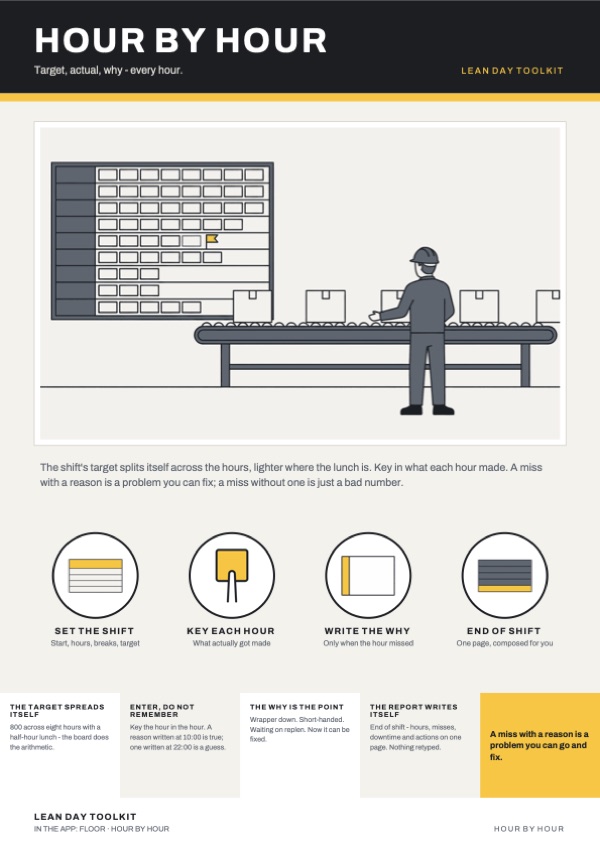
The Hour by Hour poster has the four steps, set the shift, key each hour, write the why and end of shift, on one A4 page with the same 800-carton example. It is free to download and print, and it is one of 19 free lean posters.
Hour-by-hour boards in Lean Day Toolkit
Lean Day Toolkit has the hour-by-hour board under Floor → Hour by hour, in the full version of the app. You set the line, lead, start time, hours, breaks and shift target. The app spreads the target across the hours according to the minutes each hour has, and the hours always add up to the shift target exactly. When you enter an hour, it asks for a reason only if that hour missed. At the end of the shift it puts together a one-page A4 report from the hour board, the downtime log and the audits, actions and waste captured during the shift, so nothing is typed twice.